


Phantom power is a critical source of energy, ranging from 12 to 48 volts DC, delivered directly through XLR cables to power condenser microphones. These mics require this voltage for their internal components to function correctly, leading to better sound quality. In contrast, dynamic microphones typically don’t need phantom power and can even produce unwanted noise if used improperly. Curiously, rumor has it that ribbon mics can be damaged by phantom power, so caution is key. Keep on exploring to discover more insights about microphone compatibility and proper handling!
Key Takeaways
- Phantom power delivers 12 to 48 volts DC through XLR cables, essential for activating condenser microphones’ internal components.
- Condenser microphones require phantom power for optimal performance, while dynamic mics don’t need it but can tolerate it.
- Ribbon microphones do not require phantom power and can be damaged if exposed, so consult manufacturer guidelines.
- Always turn off phantom power before connecting or disconnecting microphones to prevent power surges.
- Use an audio interface with built-in phantom power for convenient voltage delivery to condenser mics.
What Is Phantom Power and How Does It Work?

Hey! You know, phantom power might sound a bit mysterious, but it’s actually a key player in today’s audio setups. In simple terms, phantom power sends 12 to 48 volts of Direct Current (DC) through the pins of an XLR cable, specifically pins 2 and 3. This electricity is crucial for condenser microphones; they need it to get their internal parts fired up and ready to capture sound.
Instead of dealing with bulky power supplies, you can easily find phantom power coming directly from audio interfaces or mixers—super convenient, right? For instance, if you’re using a studio microphone like the Shure KSM32, you’ll benefit from phantom power to enhance your recordings. Plus, when it’s on, phantom power can actually lower the impedance of high-impedance condenser mics, which helps improve the overall sound quality.
Now, while dynamic microphones usually don’t need phantom power, they can typically handle it just fine—though be cautious with certain ribbon mics, as they can get damaged by it. Getting a solid grasp on how phantom power works will definitely help you set up your audio gear more effectively! Now, let’s talk about the types of microphones that best suit your recording needs. Many professional wireless microphone systems, like the Shure BLX24/B58, support condenser mics and benefit from phantom power to maintain crisp sound quality in live settings.
Why Do Some Microphones Require Phantom Power?

So, have you ever wondered why some microphones need phantom power? Well, it’s because certain types, especially condenser microphones, rely on this external voltage to do their job. Typically, phantom power sends 48 volts through an XLR cable, which is essential for getting the microphone’s diaphragm to vibrate and its internal electronics to work correctly.
Imagine trying to blow up a balloon without any air—pretty frustrating, right? That’s kind of what happens when a condenser mic doesn’t get phantom power; it can either end up not working at all or sounding pretty awful. While dynamic microphones can use phantom power too, they don’t need it to function, so it’s mostly the condenser mics that benefit from it.
In a recording studio, it’s common for mixers and audio interfaces to have phantom power built in. This means that when you plug in a condenser mic, it automatically gets the voltage it needs to deliver that rich, clear sound that can really elevate your recordings. It’s amazing how something as simple as providing that power can make such a big difference in audio quality! Additionally, microphones with a high signal-to-noise ratio often depend on phantom power to maintain clear and professional-grade audio.
Recommended Products

For Recording Studios and Touring

Pocket-sized pro audio – CM–15 field microphone is the first all-in-one microphone offering a combination of 48 V phantom powered mini xlr, high-quality audio converter, preamp, 3.5 mm line output and battery power. it’s the most versatile portable studio microphone available.
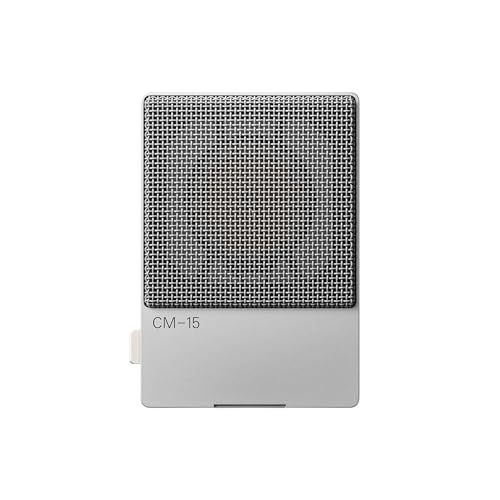
pocket-sized pro audio – CM–15 field microphone is the first all-in-one microphone offering a combination of 48 V phantom powered mini xlr, high-quality audio converter, preamp, 3.5 mm line output and battery power. it’s the most versatile portable studio microphone available.
Understanding Phantom Power Needs for Dynamic and Ribbon Microphones?

Hey there! If you’re getting into audio recording, one thing that really matters is understanding the power needs of different microphone types. For example, dynamic microphones don’t need phantom power at all; they simply work without any active electronics. While you can technically apply phantom power to them, it might cause some unwanted noise, so it’s best to keep it off.
Now, ribbon microphones are a bit different. They’re a specialized type of dynamic mic and can be quite sensitive to phantom power. That means it’s super important to check the manufacturer’s guidelines before you even think about flipping that switch. If you’re setting up a home recording, remember to turn off the phantom power when you’re plugging or unplugging microphones. This little precaution can help you avoid any annoying power surges.
Many modern dynamic mics are built to tolerate phantom power without any issues, but older models may not be as robust. For instance, if you have an older Shure mic, you might want to stick to using just the mic without phantom power to be on the safe side. Understanding these differences will not only help you get the best sound but also keep your gear safe and sound. It’s also worth noting that condenser microphones require phantom power to operate due to their active electronics design. Now, let’s move on to picking out the right cables for your setup!
Recommended Products

8 channel high-performance PureDrive mic preamps

Inspired by the iconic 1073, featuring hand-wired, Class A components for authentic analog sound.
Frequency range- 20hz-20khz
Best Practices for Using Phantom Power Safely
Hey there! Let’s chat about phantom power—it’s super important to use it safely to keep your sound quality crisp and your gear in good shape. First things first: always turn off the phantom power before you plug or unplug your microphones. If you don’t, you might hear a loud pop that could damage your equipment. For example, I once forgot this and my mic nearly short-circuited!
Also, make sure your microphone is compatible with phantom power. Condenser mics need that boost, but ribbon microphones can get hurt by the wrong voltage. It’s like giving the wrong kind of fuel to a car; you want to keep everything running smoothly. Check the specs on your mixer or audio interface since they typically provide 48 volts of power.
Another handy tip is to keep an eye on your phantom power levels with a voltage meter. This will let you know they’re safe and everything is working as it should. And remember, if you’re using dynamic mics, which don’t need phantom power, make sure to turn that option off to avoid any unnecessary risks.
Following these simple practices can really help you maintain great sound and extend the life of your equipment. Additionally, using an audio interface with phantom power (+48V) simplifies the process and ensures proper voltage delivery for condenser microphones.
So, now that we’ve tackled phantom power safety, let’s explore how to choose the right microphone for your needs!
Recommended Products

FLAGSHIP SOUND QUALITY: Get the sound of Symphony Mk ii right on your desk with our legendary A/D and D/A conversion that delivers ultra-low distortion and provides a transparent window into the sonic landscape of your mix and recordings.

Next-gen 28 x 32 USB3 audio interface — Builds on 22 years of proven success as an industry-leading audio interface brand.

For Producers, Musicians, Creators with 8 Mic / Line / Hi-Z Preamp
Tips for Troubleshooting Phantom Power Issues
Troubleshooting phantom power issues can feel a bit overwhelming, especially if you’re just getting started with audio gear. First things first, check if your microphone even needs phantom power. For instance, ribbon microphones don’t require it and can actually get damaged by it.
Now, if you’re using a condenser mic and it’s not picking up any sound, make sure the phantom power is switched on in your mixer. You typically need 48 volts DC for it to work properly. If you’re not sure, grab a multimeter and check the voltage on your XLR cable—it should sit comfortably between 11 to 52 volts, and you want to see a steady reading.
By the way, if you’re using dynamic mics and notice some unwanted noise, try turning off the phantom power. This simple step can cut down on interference significantly. And don’t forget! Always switch off the phantom power before connecting or disconnecting mics. This helps avoid those loud pops that can potentially damage your equipment.
Taking these steps makes troubleshooting much easier and helps ensure your audio setup runs smoothly. Once you’ve got the phantom power sorted, you can focus on finer details like mic placement and sound quality! It’s also important to use high-quality cables with proper shielding to prevent noise and signal loss during operation.
Recommended Products

INCREDIBLE IMAGE QUALITY: Features Full-Frame 6K image sensor with native resolution of 6048 x 4032 and Leica L lens mount; 13 stops of dynamic range to capture even the slightest details; Dual gain ISO up to 25,600 to minimize grain and noise in all lighting conditions; Built-in OLPF for better detail handling.

INCREDIBLE IMAGE QUALITY: Features Super 35 image sensor with native resolution of 6144 x 3456 and an active EF/EF-S lens mount; 13 stops of dynamic range to capture even the slightest details; Dual gain ISO up to 25,600 to minimize grain and noise in all lighting conditions; Built-in 2, 4, and 6 stop ND filters.

INCREDIBLE IMAGE QUALITY: Features Super 35 image sensor with native resolution of 6144 x 3456 and an active EF/EF-S lens mount; 13 stops of dynamic range to capture even the slightest details; Dual gain ISO up to 25,600 to minimize grain and noise in all lighting conditions.
Frequently Asked Questions
What Kind of Mics Need Phantom Power?
Condenser microphones, especially large and small diaphragm types, require phantom power for operation, while dynamic microphones typically do not. Ribbon microphones may be sensitive to phantom power. Active DI boxes usually need phantom power, whereas passive DI boxes do not.
Why Do Some Mics Require Phantom Power?
In the audio recording symphony, certain microphones, like condenser microphones, demand phantom power due to their intricate design. This power supply enhances sound quality and supports studio equipment and audio interfaces, whereas dynamic microphones typically thrive without it.
How Do You Know if You Need Phantom Power?
To determine phantom power necessity, assess microphone types. Condenser mics typically require it for ideal sound quality, while dynamic mics do not. Check power requirements and equipment compatibility within audio interfaces and recording setups for best results.
What Mic Doesn’t Need Phantom Power?
Dynamic microphones, battery-operated mics, and USB microphones typically do not require phantom power. In contrast, ribbon microphones and electret condensers may need careful handling, as active versus passive design greatly influences power requirements and mic preamps.


